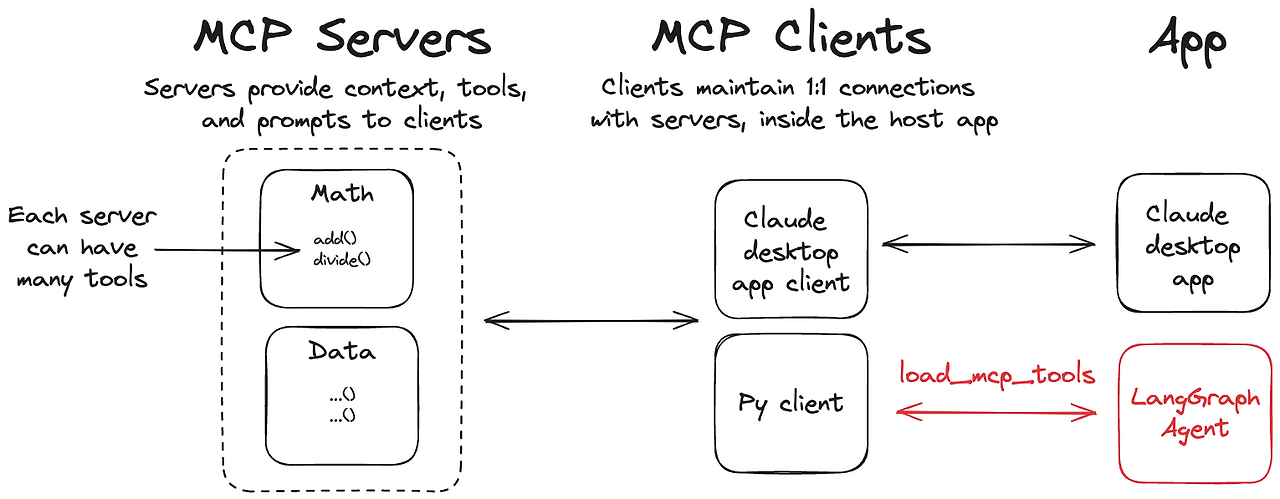
1. 서론
현대 AI 에이전트는 단순한 언어 이해를 넘어, 외부 툴·서비스와의 원활한 연동이 필수입니다. Anthropic이 제안한 MCP(Model Context Protocol)는 LLM 에이전트와 툴을 연결하는 경량 표준 인터페이스로, HTTP·stdio·SSE 등 다양한 통신 방식을 지원합니다.
하지만 MCP 서버를 LangChain이나 LangGraph 기반 에이전트에 직접 붙이려면, 클라이언트 세션 관리·툴 래핑 등 여러 수작업이 필요합니다. langchain-mcp-adapters 라이브러리는 이러한 과정을 추상화해 주어, 몇 줄의 코드만으로 MCP 서버를 LangChain 호환 툴로 변환하고, 멀티 서버 구성까지 손쉽게 할 수 있도록 돕습니다.
이 글에서는 langchain-mcp-adapters의 주요 기능과 설치 방법, 그리고 Quickstart 예시를 통해 실제로 어떻게 사용되는지 살펴보겠습니다.
2. 전제조건
- Python 3.8 이상 개발 환경
- LangChain/LangGraph 설치 및 기본 사용 경험
- Anthropic MCP 개념 이해 (툴 서버가 MCP 표준을 따름)
- OpenAI 또는 Anthropic API 키 (LangGraph 에이전트용)
3. langchain-mcp-adapters 라이브러리 개요
3.1 주요 기능
- MCP ↔ LangChain 툴 자동 변환
MCP 서버에 등록된 모든 툴을 LangChain Tool 객체로 래핑 - MultiServerMCPClient
여러 MCP 서버(예: 수학 서버, 날씨 서버)를 하나의 클라이언트에서 관리 - LangGraph 통합
LangGraph API 서버 환경에서도 동일한 방법으로 MCP 툴 사용
3.2 설치 방법
pip install langchain-mcp-adapters langgraph langchain-openai4. 공식 Github 예시
공식 Github에서 제공하는 코드를 살펴보겠습니다. 먼저 단일 MCP를 사용하는 방법입니다.
4.1 단일 MCP
- MCP 서버 구현 (math_server.py)
- LangChain 에이전트에서 툴 로드 및 실행
MCP 서버 (FastMCP)
# math_server.py
from mcp.server.fastmcp import FastMCP

mcp = FastMCP("Math") # MCP 명칭 정의

# 동작을 정의합니다.
@mcp.tool()
def add(a: int, b: int) -> int:
    """Add two numbers"""
    return a + b

@mcp.tool()
def multiply(a: int, b: int) -> int:
    """Multiply two numbers"""
    return a * b

if __name__ == "__main__":
mcp.run(transport="stdio")- FastMCP("Math")로 서버 인스턴스 생성
- @mcp.tool() 데코레이터로 add, multiply 함수 등록
- mcp.run(transport="stdio")로 stdio 기반 서버 실행
Client
from mcp import ClientSession, StdioServerParameters
from mcp.client.stdio import stdio_client
from langchain_mcp_adapters.tools import load_mcp_tools
from langgraph.prebuilt import create_react_agent
from langchain_openai import ChatOpenAI

model = ChatOpenAI(model="gpt-4o")

server_params = StdioServerParameters(
    command="python",
    # 본인의 math_server.py 경로를 입력하면 됩니다.
    args=["/path/to/math_server.py"],
)

async with stdio_client(server_params) as (read, write):
    async with ClientSession(read, write) as session:
        # Initialize the connection
        await session.initialize()

        # Get tools
        tools = await load_mcp_tools(session)

        # agent로 구성하고 사전에 정의한 tool을 연결합니다.
        agent = create_react_agent(model, tools)
agent_response = await agent.ainvoke({"messages": "what's (3 + 5) x 12?"})- stdio_client 또는 HTTP/SSE 클라이언트로 MCP 서버 연결
- ClientSession으로 세션 초기화
- load_mcp_tools(session) 호출 → LangChain Tool 리스트 획득
- LangChain 에이전트(create_react_agent 등)에 모델과 함께 연결
- 에이전트에게 질문 전달 → 내부적으로 MCP 툴 호출 후 응답
4.2 다중 MCP
MCP 서버 (FastMCP)
실제 프로젝트에서는 하나의 서버만 사용하는 경우가 드뭅니다. 예를 들어:
- 수학 서버 (stdio)
- 날씨 서버 (SSE 기반 외부 API 래핑)
# weather_server.py
from typing import List
from mcp.server.fastmcp import FastMCP

mcp = FastMCP("Weather")

@mcp.tool()
async def get_weather(location: str) -> str:
    """Get weather for location."""
    return "It's always sunny in New York"

if __name__ == "__main__":
    mcp.run(transport="sse")
python weather_server.py
- 서버를 설정할 때 미리 MCP server python 파일을 실행하여 띄워둡니다.
- 이때 포트번호와 호스트를 명확하게 하고싶다면 아래와 같이 mcp를 정의할 때 지정하면 됩니다.
mcp = FastMCP("Weather", host="0.0.0.0", port=8000)Client
다중 MCP를 사용할 때, MultiServerMCPClient를 사용하면, 각 서버별 클라이언트를 묶어서 한 번에 세션 관리가 가능합니다.
from langchain_mcp_adapters.client import MultiServerMCPClient
from langgraph.prebuilt import create_react_agent

from langchain_openai import ChatOpenAI
model = ChatOpenAI(model="gpt-4o")

async with MultiServerMCPClient(
    {
        "math": {
            "command": "python",
            # 실제 server 주소 입력
            "args": ["/path/to/math_server.py"],
            "transport": "stdio",
        },
        "weather": {
            # 실행한 주소 및 포트번호 입력
            "url": "http://localhost:8000/sse",
            "transport": "sse",
        }
    }
) as client:
    agent = create_react_agent(model, client.get_tools())
    math_response = await agent.ainvoke({"messages": "what's (3 + 5) x 12?"})
    weather_response = await agent.ainvoke({"messages": "what is the weather in nyc?"})
이렇게 하면, 에이전트가 수학 계산과 날씨 조회를 모두 툴 호출만으로 처리할 수 있습니다.
5. 문서 검색 MCP 제작하기
공식문서는 다 봤고, 이제는 직접 MCP를 구현하여 사용해보겠습니다.
제가 만든 MCP는 LangGraph 중 Adaptive RAG를 구현하는 방법을 검색해주는 retriever입니다.
LangGraph를 실제로 만들다보면 ChatGPT같은 LLM들이 학습을 제대로 하지 못해 코드를 생성하지 못하는데 이렇게 공식문서에 있는 문서를 기반으로 답변을 준다면 LangGraph를 제작할 때도 쉽게 사용할 수 있을 것 같아 만들어봤습니다.
이번 예제에서는 공식문서 중 Adaptive RAG만 가져와서 문서로 저장했기에 한계가 있지만 좀 더 확장을 시킨다면 좋을 것 같습니다.
MCP 서버 (FastMCP)
# faiss_pdf_mcp.py
import os
from typing import List
from mcp.server.fastmcp import FastMCP
from langchain_community.document_loaders.pdf import PDFPlumberLoader
from langchain_openai import OpenAIEmbeddings
from langchain_community.vectorstores.faiss import FAISS
from langchain.schema import Document
from dotenv import load_dotenv

# API KEY 정보로드
load_dotenv()

# PDF 로더 & 임베딩 모델 준비
PDF_PATH = "./data/langgraph_adaptive_rag.pdf"  # ← 여기에 분석할 PDF 파일 경로를 넣으세요
loader = PDFPlumberLoader(file_path=PDF_PATH)
embeddings = OpenAIEmbeddings(model="text-embedding-3-small")

# 문서 로드
docs = loader.load()

# FAISS 인덱스 생성
faiss_index = FAISS.from_documents(
    documents=docs,
    embedding=embeddings,
)

# 검색기 생성
retriever = faiss_index.as_retriever(search_kwargs={"k": 8})

# MCP 인스턴스 생성
mcp = FastMCP("faiss_retriever")

# MCP 툴 정의
@mcp.tool()
def retrieve(query: str) -> List[str]:

    results = retriever.invoke(query)
    # Document 객체의 .page 메타데이터와 .page_content를 함께 반환
    return [
        f"[page {doc.metadata.get('page')}] {doc.page_content}"
        for doc in results
    ]

# 7) 서버 실행
if __name__ == "__main__":
    # stdio 방식으로 MCP 서버 실행
    mcp.run(transport="stdio")
동작 결과
Client 구축은 다중 MCP 구축의 Client와 큰 차이가 없습니다.
추가적으로 새로 만든 나의 MCP만 하나 더 추가하면 사용할 수 있습니다.
결과부터 미리 말씀드리면, 각각의 질문에 맞게 MCP server를 찾아서 답변을 줍니다.
물론 LLM이 잘 모르는 LangGraph를 구현하는 방법도 제가 만든 MCP server를 이용해서 답변하는 걸 아래와 같이 볼 수 있습니다.
질문
math_response = await agent.ainvoke({"messages": "what's (3 + 5) x 12?"})
weather_response = await agent.ainvoke({"messages": "what is the weather in nyc?"})
faiss_response = await agent.ainvoke({"messages": "langgraph에서 adaptive rag를 구축하는 방법을 알려주세요."})
답변
📘 Math Response:
The result of \((3 + 5) \times 12\) is 96.

🌤️ Weather Response:
The weather in New York City is always sunny!

🧠 FAISS / LangGraph Response:
Adaptive RAG (Retrieval-Augmented Generation) in LangGraph can be constructed by combining query analysis and an active/self-corrective approach to enhance the retrieval results based on user queries. Here's a step-by-step guide to implementing Adaptive RAG in LangGraph:

### 1. Set Up Your Environment
First, you need to install the necessary packages and set up your API keys:

```python
!pip install -U langchain_community tiktoken langchain-openai langchain-cohere langchainhub chromadb

import getpass
import os

def _set_env(var: str):
    if not os.environ.get(var):
        os.environ[var] = getpass.getpass(f"{var}: ")

_set_env("OPENAI_API_KEY")
_set_env("TAVILY_API_KEY")
```

### 2. Create an Index
Start by creating an index for your documents. This is essential for the retrieval system.

```python
from langchain.text_splitter import RecursiveCharacterTextSplitter
from langchain_community.document_loaders import WebBaseLoader
from langchain_community.vectorstores import Chroma
from langchain_openai import OpenAIEmbeddings

# Set embeddings
embd = OpenAIEmbeddings()

# Load documents from URLs
urls = [
    "https://example.com/document1",
    "https://example.com/document2",
    # Add more URLs as needed
]

# Load and split documents
docs = [WebBaseLoader(url).load() for url in urls]
doc_splits = RecursiveCharacterTextSplitter().split_documents(docs)

# Add to vectorstore
vectorstore = Chroma.from_documents(documents=doc_splits, embedding=embd)
retriever = vectorstore.as_retriever()
```

### 3. Define the Graph State
Create a state representation to keep track of the current question, generated answers, and relevant documents.

```python
from typing import List
from typing_extensions import TypedDict

class GraphState(TypedDict):
    question: str
    generation: str
    documents: List[str]
```
6. 결론
이제는 자신의 MCP를 구축하여 LangGraph에서도 쉽게 통합이 가능하며 이번 예제만 보더라도 기존의 ChatGPT가 답변하지 못하는 LangGraph와 관련된 정보도 Client 부분에서는 몇 줄 안되는 코드를 붙여 통합이 가능합니다.
그렇다고 MCP server를 제작하는 것이 어렵냐? 그것도 아닙니다. 이제는 본인이 직접 만든 MCP를 사용하던 외부에서 가져와서 다운을 받아 사용하던 주소로 사용하던 쉽게 사용하여 자신만의 챗봇을 확장할 수 있습니다.
자세한 코드를 참고하시려면 제 github에 들어가서 보시면 됩니다.
https://github.com/IanYang95/mcp_langchain_langgraph
GitHub - IanYang95/mcp_langchain_langgraph: mcp 제작 예제
mcp 제작 예제. Contribute to IanYang95/mcp_langchain_langgraph development by creating an account on GitHub.
github.com
이번 블로그를 작성하며 참고한 문서는 아래와 같습니다.
https://github.com/langchain-ai/langchain-mcp-adapters?tab=readme-ov-file
GitHub - langchain-ai/langchain-mcp-adapters
Contribute to langchain-ai/langchain-mcp-adapters development by creating an account on GitHub.
github.com
감사합니다.
'NLP' 카테고리의 다른 글
| [LangGraph]SQL Agent + Qwen3 (with ollama) (5) | 2025.05.16 |
|---|---|
| LangGraph Adaptive RAG(한국어 설명) - 코드 부가 설명 추가 중 (0) | 2025.04.30 |
| MCP(Model Context Protocol)에 대하여~ (0) | 2025.03.31 |
| QwQ 모델 think 과정과 Exaone의 한국어 합친다면? (0) | 2025.03.16 |
| DeepSeek 양자화 1.58B 사용 방법 정리 (2) | 2025.02.24 |